

Smart leak detector adoption is no longer a luxury—it’s the most cost-effective insurance you can buy against major water damage in modern homes or rental properties.
Key Takeaways
- Smart leak detectors prevent thousands in water damage for well under $50 per hotspot, with market prices dropping fast in 2024–2025.
- The main pain points—false alarms, unreliable app alerts, and short battery life—can be avoided with smart placement and savvy product selection.
- Insurance incentives and app integrations make these devices more valuable than ever for homeowners and rental property managers.
- Why a smart leak detector matters now
- 2024–2025 market snapshot: prices, sales and install costs
- How to choose the right sensor type (spot sensor vs cable vs flow + auto‑shutoff)
- Top user pain points and how to avoid them
- Three advanced considerations most buyer guides miss
- Best smart leak detector for home — recommendations by use case
- Placement and installation—practical step‑by‑step (DIY and when to call a pro)
- Connectivity and app alerts — making notifications reliable
- Battery life, maintenance schedule and lifecycle costs
- Insurance, savings and ROI — will sensors lower premiums?
- Troubleshooting quick guide (false alarms, app not ringing, low battery)
- FAQ
- Quick shopping checklist + call to action
Why a smart leak detector matters now
Water damage remains one of the most expensive home disasters, especially with rising insurance deductibles and the increased cost of repairs. The latest market data shows the global smart-water-leak-detector market size is close to $120 million in 2024–2025—a jump driven by homeowners and landlords realizing just how affordable sensors have become compared to the potential cost of a basement flood or pipe burst.
Think of a smart leak detector as an always-on loss prevention tool, much like a smoke alarm but for hidden water risks. While these sensors alert you when trouble starts, they can’t fix leaks or prevent every possible disaster. Still, they offer incredibly cheap peace of mind, and many insurers now recognize them when setting premiums or settling claims.

2024–2025 market snapshot: prices, sales and install costs
Average WiFi water leak sensor prices have dropped from about $75 just a few years ago to less than $45 today. Entry-level Zigbee or Z-Wave models run $20–$35, making it easier to install several at once. If you want whole-line protection, premium flow-and-shutoff kits cost $400–$700, but these can prevent catastrophic damage by automatically shutting off the main water supply when leaks are detected.
Professional installation varies by region. In North America, expect $150–$300 for pro retrofit work, including smart shut-off valve setups. Western Europe installs typically cost €100–€250, while DIY rates or basic contractor setups in Asia-Pacific make it accessible at $50–$150, reflecting lower local labor costs and local supplier options.
For many, the best smart leak detector for home is simply the first one you deploy in a high-risk area—like a basement water alarm sensor or beneath the washing machine. Multi-packs and wireless tech now make this a fast upgrade, not a drain on your budget.
How to choose the right sensor type (spot sensor vs cable vs flow + auto‑shutoff)
Most buyers choose between three sensor types:
- Spot (floor) sensors: Placed under appliances or pipes, they trigger on any pooling water. Great for laundries, basements, and under sinks. Affordable and ultra-quick to install.
- Sensing cables: Detect leaks along long runs of floor or wall, especially near baseboards, hot water tanks, or sump pumps.
- Whole-home flow monitors with auto-shutoff: Attached at or near the main and use real-time analytics to catch usage anomalies. Some require pro install or valve retrofit but offer the highest level of protection and possible insurance incentives.
Basement water alarm sensor applications typically match best with spot sensors (for sump/low points) or cables in larger finished rooms. Premium flow monitors—sometimes starting at $299 for clamp-on versions, rising to $400–$700 for auto-shutoff types—are ideal if you’ve already had trouble or want remote shutoff (i.e., for extended vacation or rental units).
For more advanced placement scenarios—like protecting multiple rental units or large family homes—combining spot and cable sensors on a single smart platform is the most budget-friendly approach.
Top user pain points and how to avoid them
Three issues account for most user complaints seen in reviews and research studies:
- False alarms: High humidity, condensation, or incorrect placement (too close to humidifiers or damp crawl spaces) can trigger unwanted alerts. Adjust sensitivity if your device supports it or relocate the sensor if nuisance alarms persist.
- Unreliable app notifications or syncing: WiFi water leak sensor notifications sometimes arrive late or not at all, especially with generic third-party apps. Always test mobile alerts after installation and update firmware for improved reliability.
- Short battery life: Many sensors require new batteries every 1–3 years, but some premium models advertise 5+ years. Tracking battery health in your app—and keeping spares handy—avoids surprise dead zones.
Smart placement, routine monthly testing, and sticking with brands that prioritize app support will resolve most of these issues. Always choose a leak detector with app alerts rated highly by owners, not just reviewers.
Three advanced considerations most buyer guides miss
The following “dealbreaker” factors are rarely discussed but may determine long-term satisfaction (and claim success):
- Smart-home platforms and automations: Buy a smart leak detector that matches your current platform—if you use Alexa, Google, or HomeKit, stick with models that support deep integration. For example, the Fibaro Flood Sensor ($45, Z-Wave) connects seamlessly with Alexa, Google Home, and Siri, offering more advanced automations like shutting off HVAC or sending multiple alerts.
- Data privacy and firmware security: Only use sensors with encrypted communications and a proven over-the-air update policy. The Aqara Water Leak Sensor ($30, Zigbee) leads here, offering 2-year battery life and robust data security.
- Firmware support and predictive features: Choose sensors from brands (like Eve Water Guard, HomeKit-only, $80) with regular firmware/feature rollouts and AI-driven leak analytics—this is especially valuable for insurance claims and reliability over five or ten years.
Cited research found these topics are often missing in even top buyer’s guides—yet can directly affect security, peace of mind, and long-term savings. For further reading on lifecycle cost considerations, see this industry analysis.
| Model | Connectivity | Battery Life | App Platform | Price | Best Use Case |
|---|---|---|---|---|---|
| Fibaro Flood Sensor | Z‑Wave | 2 years | Alexa, Google, Siri (SmartThings) | $45 | Platform & automation integration |
| Aqara Water Leak Sensor | Zigbee | 2 years | Aqara Home, Apple HomeKit | $30 | Security/privacy; multi‑sensor setups |
| Eve Water Guard | WiFi (HomeKit‑only) | 2 years | Apple HomeKit | $80 | Firmware updates; advanced analytics |
| Typical Wi‑Fi entry sensor | WiFi | 1–3 years | Brand app, Alexa/Google/IFTTT | $35–$80 (3‑pack) | DIY budget/quick alerts |
| Premium shut‑off system | WiFi/Zigbee/Z‑Wave | Battery/AC | Mobile app + smart home hub | $400–$700 | Whole‑home main water protection |
Best smart leak detector for home — recommendations by use case
With market prices the lowest they’ve ever been, there’s no excuse not to cover your highest risk areas. Here are the best configurations:
- Best for quick DIY spots (sinks, appliances, basement): Entry Zigbee/Z-Wave sensors ($20–$35) or WiFi 3-packs ($35–$80). Reliable, loud local sirens and instant alerts.
- For Alexa/Google/HomeKit integration: Fibaro Flood Sensor ($45, Z‑Wave) or Aqara Water Leak Sensor ($30, Zigbee); both support automations and have proven battery/runtime records.
- Apple HomeKit users: Eve Water Guard ($80) offers robust firmware updates and long-term reliability but is HomeKit-only.
- Whole-home main shutoff: Premium flow and valve kits ($400–$700), suitable for high-value homes or absentee landlords.
- Basement flooding risk: Pair a spot sensor—like Aqara or Fibaro—with a cable sensor for low points or sump pumps. This combo reduces false alarms and covers more floor area.
For those unsure where to start, protecting laundry and utility rooms is a smart first move, followed by expanding coverage to high-value or high-risk locations. If reliability is the single biggest concern, stick to brands that support your preferred app platform and offer at least two years of battery runtime.
For additional strategies on optimizing home systems, check out our guide on complex environmental systems.
Placement and installation—practical step‑by‑step (DIY and when to call a pro)
- Identify all high-risk zones: basements, laundry rooms, under kitchen sinks, behind dishwashers and washing machines, and around water heaters.
- Choose wireless for easiest install (most new models); only opt for wired if you want permanent mounts and have power/outlets nearby.
- Wipe down surfaces and mount sensors directly on the floor, flat side down, in the lowest reachable area (water seeks the lowest level).
- Avoid placements right next to humidifiers or HVAC vents—these create false alarms from moisture, not leaks.
- Test each sensor by placing a damp sponge or a shallow dish of water beneath it—the app and/or alarm should fire within seconds.
If you’re adding a main-line flow monitor or an auto-shutoff valve, consider hiring a plumber—North American rates run $150–$300, Western Europe €100–€250, and Asia-Pacific $50–$150 for pro install or valve retrofits. For leak detector with app alerts in a customized deployment, always follow the product’s setup routine and check compatibility with your smart hub.
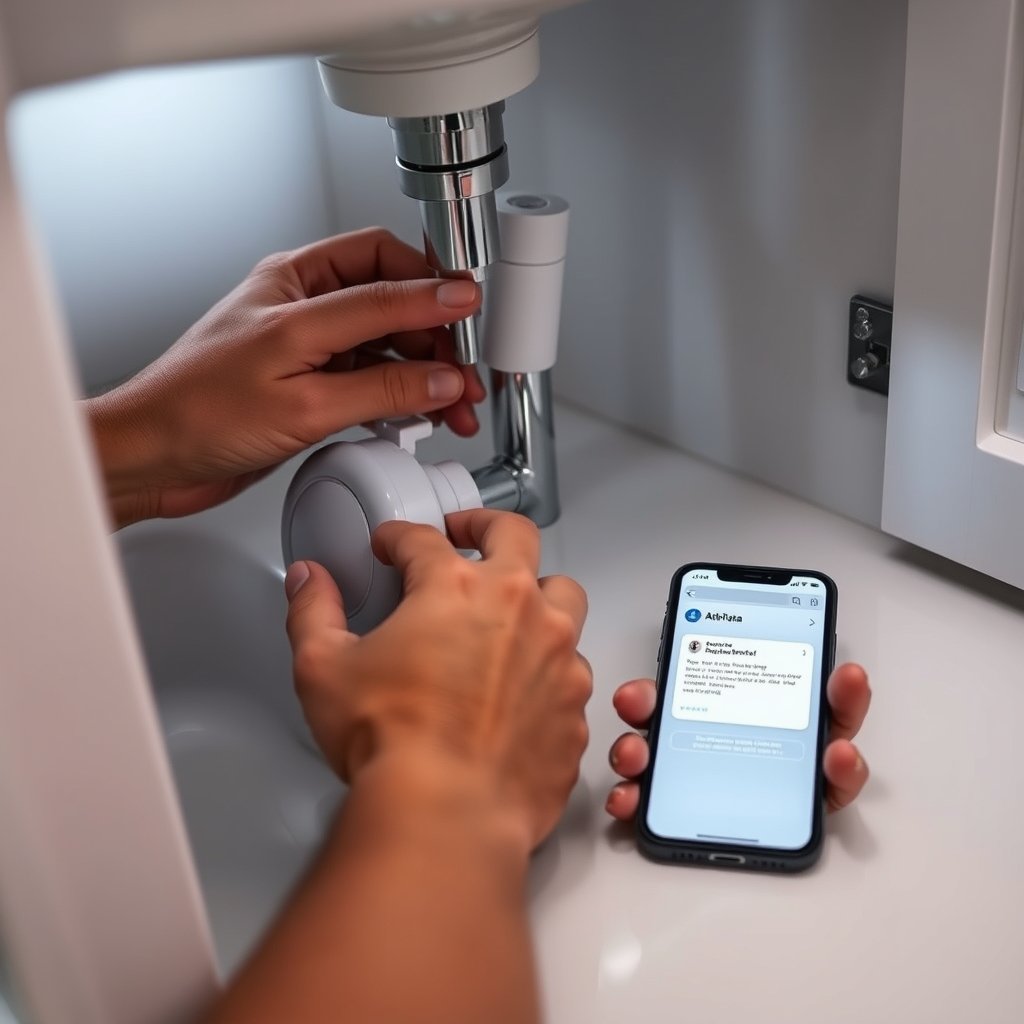
For more details on sensor alignment, placement, and stepwise testing, refer to our insider guide on system transformations and layered processes.
Connectivity and app alerts — making notifications reliable
The reliability of your leak alerts depends on two essentials: connectivity and app support. WiFi water leak sensor choices are abundant now, with prices under $45, but beware: an unreliable app can mean missed alarms. When possible, select models with consistently good app reviews, regular updates, and reliable push notifications.
If you use Zigbee or Z‑Wave, ensure your smart home hub has a strong mesh signal in the basement or utility areas, as these can lose contact if too far from the main device.
- Test alert delivery after setup and monthly—simulate a leak to confirm your phone rings instantly.
- Enable notification redundancy (texts, emails, multiple users) for must-catch zones like rental units.
- If alerts aren’t coming through, reset the device pairing, update firmware, and double check permissions in your app.
Consistent testing closes the reliability gap, especially for remote landlords or busy homeowners frequently out of WiFi range.
Dig deeper into notification strategies in our post on layered system outcomes.
Battery life, maintenance schedule and lifecycle costs
Most smart leak detector options run on coin or AA batteries that last 1–3 years (Fibaro and Aqara both claim two years under normal conditions; some premium models advertise up to 5+ years). Replace batteries as soon as low-battery alerts appear to keep coverage seamless. Include this in your monthly home check.
Total cost of ownership for a full setup:
- Entry sensor: $20–$35 each (or $35–$80/pack for WiFi multi-packs)
- Premium auto-shutoff kit: $400–$700 plus install
- Batteries: $2–$10/year per unit (most)
- Install (if hired): see local rates above
Batteries, not install costs, are the main running expense for DIY setups. For dense deployments (apartment blocks, multiplex properties), budgeting for battery swaps is crucial. For lifecycle analytics and deeper cost insights, see this industry report.
Insurance, savings and ROI — will sensors lower premiums?
Insurance companies are aggressively encouraging the adoption of smart leak detectors. In Asia-Pacific and other rapidly urbanizing regions, programs now offer premium discounts, and in some cases, partial reimbursement for monitored installs. The core benefit is risk reduction—documenting use of sensors (photos, app logs, installation invoices) demonstrates proactive maintenance and can speed up claims after an incident. For major landlords, the ROI is even clearer: a $200 investment can realistically prevent tens of thousands in repairs or displacement costs.
Evidence-based home protection—including leak sensor usage and prompt app alerts—directly supports loss-reduction claims. Always keep digital records and receipts, and share with your insurer when updating your policy.
Troubleshooting quick guide (false alarms, app not ringing, low battery)
- False alarms? Relocate the sensor to a less humid spot; adjust sensitivity if available via the app.
- No app alert? Double-check WiFi or hub signal, reboot your router, update app/firmware, and re-pair the detector.
- Low battery warning? Replace battery promptly and retest after install.
- Firmware glitches? Check manufacturer’s site for updates or contact support.
- Still no luck? Contact the manufacturer or installer with your purchase info and troubleshooting steps taken.
Pain points like false alarms and missed alerts are often due to neglected placement or outdated software—fixing them is usually simple and low cost.

FAQ (short answers to common buyer questions)
Do I need WiFi for a smart leak detector?
No, some models work with Zigbee or Z‑Wave, but WiFi water leak sensors offer the widest app compatibility and remote alert features.
Where should I place a basement water alarm sensor?
On the floor near sump pumps, water heaters, or beneath the lowest accessible area—water always settles at the lowest point.
Will smart leak detectors shut off the water automatically?
Only if paired with a smart shut-off valve or a whole-home flow shut-off kit. Basic spot sensors will alert but cannot control valves alone.
How long do most batteries last?
Operational battery life for most sensors is 1–3 years; premium options now advertise up to 5 years under ideal conditions.
Can I integrate my smart leak detector with Alexa, Google, or HomeKit?
Yes, if you purchase models designed for those platforms. For example, Fibaro works with all, Eve Water Guard is HomeKit-only. Always check compatibility before buying.
Quick shopping checklist + call to action
Use this printable checklist to avoid common mistakes and prioritize your first deployment:
- Choose connectivity: WiFi, Zigbee, or Z‑Wave?
- Check battery life and ongoing replacement costs.
- Read recent app reliability reviews (look for persistent pain points and pro-active support).
- Verify integrations with your smart ecosystem (Alexa, Google, HomeKit, or platform-specific requirements).
- Compare price per sensor and plan for future expansion.
- Buy a spot sensor for your highest-risk area now—expand to cables or a main shutoff once you’ve tested reliability.
Given today’s low prices (under $45 for most WiFi units, $20–$35 for Zigbee/Z‑Wave), protecting your home or property from water damage is no longer a “someday” project—it’s a smart move you can make this week.
Ready to protect your investment? Compare our top 3 picks—and get started with your smart leak detector deployment before the next leak finds you.